ShinyForums Homepage
Forum Home Forum Home > Webshops > Webshop / Product reviews
Website Home Website SpandexPower   New Posts New Posts RSS Feed - How do I upload images to ShinyForum / SP website?
  FAQ FAQ  Forum Search   Events   Register Register  Login Login


Topic ClosedHow do I upload images to ShinyForum / SP website?

 Post Reply Post Reply
Author
Message
ShinyForums View Drop Down
Admin Group
Admin Group
Avatar

Joined: 03 Jun 2020
Location: Amsterdam
Status: Offline
Points: 413
Direct Link To This Post Topic: How do I upload images to ShinyForum / SP website?
    Posted: 19 Feb 2021 at 20:28
If you want to upload images to the forum and website please follow the steps below:

1. Create or reply on a topic. Below the text editor you will find a button 'Upload Images'


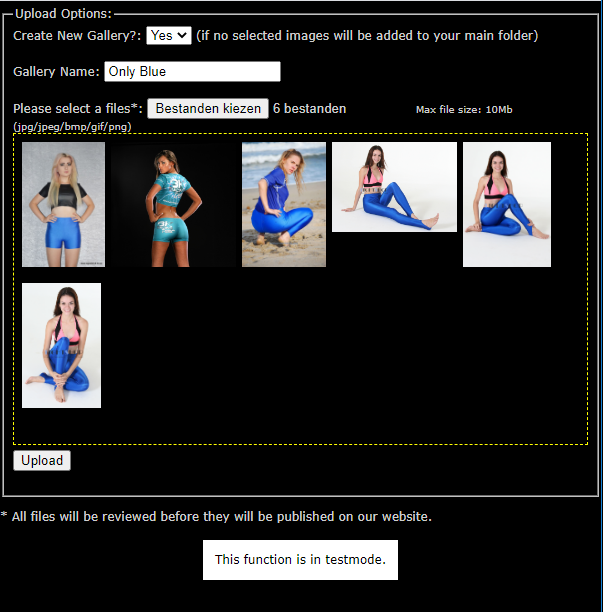
2. A pop-up window will open where you can select your images to upload:


3. Hit upload and wait for the page to complete. If the upload is complete you will see forum code. Copy all the text and paste it into your post or reply.


Edited by ShinyForums - 01 Mar 2026 at 22:15
Back to Top
Sponsored Links


Back to Top
ShinyForums View Drop Down
Admin Group
Admin Group
Avatar

Joined: 03 Jun 2020
Location: Amsterdam
Status: Offline
Points: 413
Direct Link To This Post Posted: 02 Apr 2021 at 20:57
It is now possible to add images to existing galleries.
You will now have the option to select galleries you have created before.

I will update the screenshots asap.
Back to Top
 Post Reply Post Reply

Forum Jump Forum Permissions View Drop Down


This page was generated in 0.336 seconds.

View My Stats